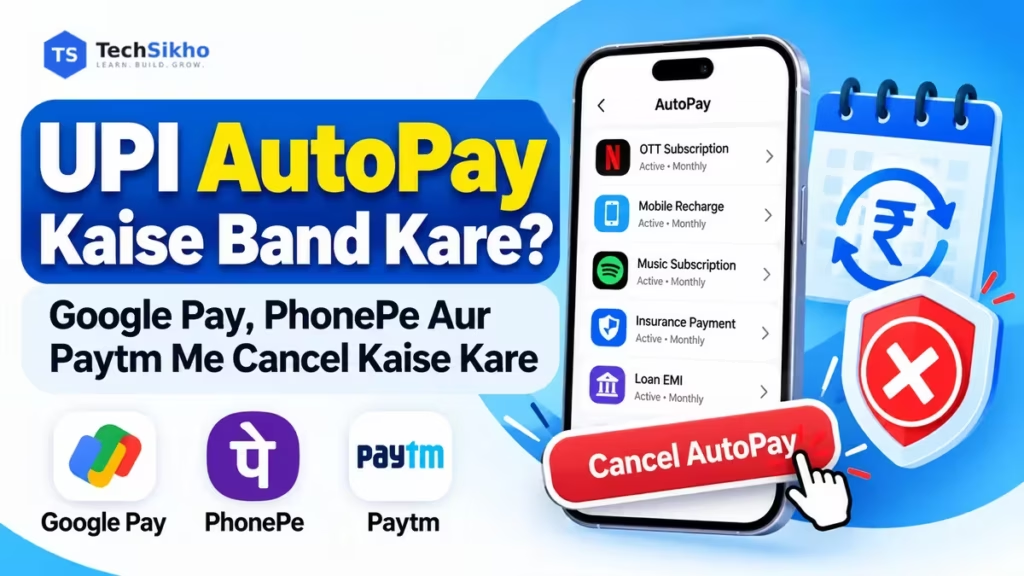
Kabhi OTT subscription liya, kuch din use kiya aur phir bhool gaye. Agle mahine bank account se paise katne par yaad aaya ki AutoPay abhi bhi chalu hai. Agar aap bhi UPI AutoPay Kaise Band Kare samajhna chahte hain, to pehle us payment ka active mandate pehchanna zaroori hai.
Google Pay, PhonePe aur Paytm me mandate kholkar available cancellation option use karein aur final status check karein. Sirf button dabana kaafi nahi: mandate cancellation, subscription cancellation aur refund teen alag cheezein hain.
Official guidance 15 October 2026 ko check ki gayi hai. App version, bank aur mandate type ke hisab se screens ya available options badal sakte hain.
UPI AutoPay Kya Hai Aur Kaise Kaam Karta Hai?
UPI AutoPay me aap merchant, yani service dene wali company, ko recurring payment ki digital permission dete hain. Approved amount aur frequency ke mutabik linked bank account se payment hoti hai. Iska use OTT subscriptions, mobile bills aur doosri eligible recurring payments ke liye hota hai.
Maan lijiye aapne Rs 299 ka monthly OTT plan AutoPay se liya. Approved mandate ke mutabik agla payment automatically ho sakta hai. Eligible debits me har baar UPI PIN dena zaroori nahi; category aur amount ke rules alag ho sakte hain. Google Pay ki AutoPay explanation bhi ye farq batati hai.
UPI AutoPay Mandate Kya Hota Hai?
Mandate payment ki permission aur uski conditions ka record hai. AutoPay section me ise kholkar ye details dekhein:
- Merchant name: Payment kis company ko jaayegi.
- Amount: Fixed payment ya approved maximum amount.
- Start date aur end date: Permission ki validity.
- Payment frequency: Monthly, yearly ya doosra approved schedule.
- Next debit date: Agla payment kab expected hai, agar dikhaya gaya ho.
- Mandate status: Active, paused, cancelled ya doosri current condition.
Maximum amount ko har mahine katne wali fixed rakam na samjhein. Variable bill me actual debit alag ho sakta hai. Normal person-to-person transfer limits ko AutoPay par seedha apply na karein; UPI transaction limit kya hai samajhte waqt payment type ka farq dhyan rakhein.
UPI AutoPay Band Karne Se Pehle Kya Check Karein?
Bank statement ya Payment History me debit ko mandate ke merchant aur linked bank account se match karein. Naam unfamiliar lage to receipt se company verify karein. Active mandate, next payment aur subscription ki cancellation conditions check karein. Last-minute cancellation par bharosa na karein.
EMI, insurance ya zaroori bill galti se band na karein. Payment method badalna hai to pehle alternative arrangement confirm karein. Mandate band hone se pehle se due bill ya contract ki zimmedari khatam nahi hoti.
Google Pay Me UPI AutoPay Kaise Band Kare?
Google Pay ki official cancellation guidance ke mutabik:
- Google Pay kholein.
- Upar apni Profile picture par tap karein.
- Autopay select karein.
- Live tab kholein.
- Sahi merchant ka mandate select karein.
- Cancel autopay chunein.
- Prompt aane par UPI PIN enter karein.
- Mandate ka status dobara check karke cancellation confirm karein.
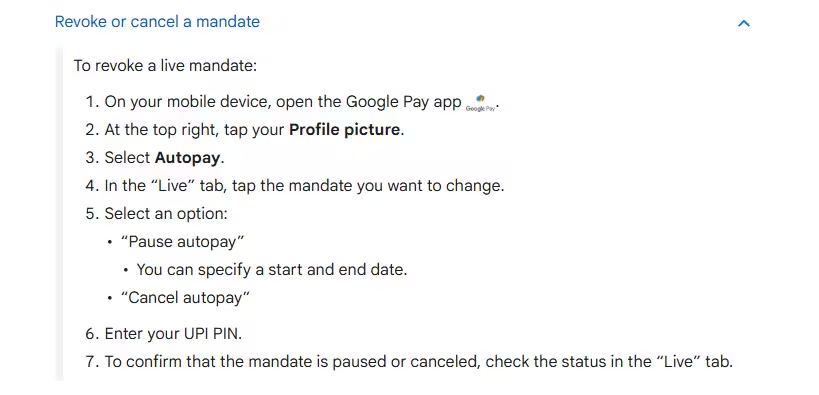
Supported mandate me Pause autopay aur pause ki dates ka option bhi mil sakta hai. Autopay section nahi dikhe to official app store se update check karein; phir bhi missing ho to Google Pay support use karein.
Loan-related mandate Google Pay se cancel nahi kiya ja sakta, aisa uski Help guidance batati hai. Iske liye lender ya merchant se sampark karein.
PhonePe Me AutoPay Kaise Band Kare?
PhonePe ki published guidance me Profile > Autopay Settings path diya gaya hai. Exact labels app version aur bank ke hisab se badal sakte hain.
- PhonePe kholkar Profile par jaayein.
- Autopay Settings dhoondhein.
- Jis active mandate ko band karna hai, use kholein.
- Merchant, amount aur linked bank account match karein.
- Available Delete, Cancel ya Revoke action chunein; exact label alag ho sakta hai.
- App me maangi gayi authentication poori karein; UPI PIN prompt aaye to khud enter karein.
- Updated mandate status aur confirmation check karein.
PhonePe AutoPay terms ke mutabik Pause, Resume aur Revoke ki availability mandate type, merchant aur applicable rules par depend karti hai. Kuch mandates me merchant ki taraf se request zaroori hoti hai. Temporary break ke liye Pause available ho to uski duration check karein.
Paytm Me UPI AutoPay Kaise Cancel Kare?
Paytm ki official AutoPay guide me Automatic Payments section diya gaya hai:
- Paytm kholein aur Profile icon par tap karein.
- Automatic Payments dhoondhein. Ye UPI & Payment Settings ke andar mil sakta hai.
- Relevant active mandate select karein.
- Details check karke available Cancel option chunein.
- App UPI PIN ya koi doosri verification maange to trusted app ke andar authentication poori karein.
- Final status check karein; pending request ko cancelled na samjhein.
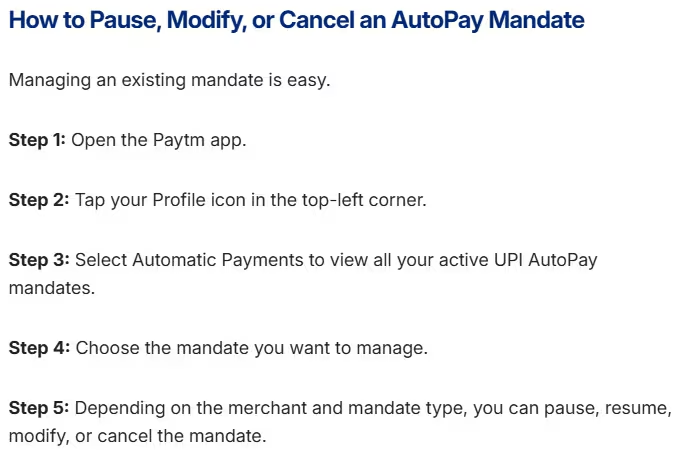
Ye linked bank account ke UPI AutoPay mandate ki guidance hai. Card recurring payment, wallet arrangement ya NACH mandate ka management alag ho sakta hai. Entry nahi mile to pehle payment receipt me method dekhein.
Google Pay, PhonePe Aur Paytm Me AutoPay Cancel Karne Ka Difference
| App | Mandate section | Available actions | Zaroori restriction |
|---|---|---|---|
| Google Pay | Profile > Autopay > Live | Cancel; supported Pause | Loan mandate ke liye merchant |
| PhonePe | Profile > Autopay Settings | Delete/Revoke; supported Pause/Resume | Merchant aur mandate rules |
| Paytm | Profile > UPI & Payment Settings > Automatic Payments | Cancel; supported Pause/Resume/Modify | Merchant aur mandate type |
Pause, Cancel Aur Revoke Me Kya Difference Hai?
- Pause: Supported mandate ko temporary rokna. Effective dates check karein.
- Resume: Paused mandate ko allowed conditions ke mutabik dobara chalu karna.
- Cancel/Revoke: Relevant mandate ki permission samapt karna, jab request successfully complete ho.
Labels alag ho sakte hain. Permanent stop chahiye to sirf Pause select karke na chhodein; pause khatam hone par payment phir shuru ho sakti hai.
Example: OTT Subscription Ab Nahi Chahiye
Maan lijiye Rs 299 wala plan ab use nahi karna. UPI app me mandate cancellation confirm karein aur OTT account me subscription ya auto-renewal bhi check karein. Paid period ka access kab tak milega, ye merchant ki policy batayegi. Google Play se li gayi subscription ke liye Google Play ka subscription cancellation process dekhein.
AutoPay Cancel Karne Ke Baad Bhi Paise Kat Sakte Hain?
Successful revocation ke baad us mandate se naye debits ki permission samapt hoti hai. Lekin cancellation ke aas-paas debit dikhe to ye possibilities check karein:
- Request pending thi: Cancel tap hua, lekin process complete nahi hua.
- Payment pehle initiate hui: Already processed debit automatically reverse nahi hota; processing payment ka status bank se poochhein.
- Doosra mandate active hai: Same service ke liye doosre account ya app ki entry ho sakti hai.
- Subscription active hai: Merchant renewal attempt kar sakta hai; koi aur authorised payment method linked ho to use bhi check karein.
Ye checking ke points hain, har debit ka pakka reason nahi. Cancellation time, transaction time aur mandate reference compare karein. Confirmed cancellation ke baad naya debit lage to app aur bank me complaint raise karein.
AutoPay Cancel Karne Ke Baad Refund Milega?
Purane successful payments ka automatic refund nahi milta. HDFC Bank ki cancellation guidance bhi completed payments aur future debits ko alag rakhti hai. Refund merchant policy, subscription terms, transaction status aur lagu consumer protections par depend karega.
Merchant ko payment receipt aur cancellation confirmation ke saath refund request bhejein. Duplicate, disputed ya unauthorised debit ho to bank aur app ke official Help section me report karein. Complaint reference sambhal kar rakhein; support se outcome aur expected timeline poochhein.
Agar UPI payment failed lekin paise kat gaye, to failed transaction ki troubleshooting alag hai. AutoPay cancellation ko completed transfer reverse karne ka tareeka na samjhein.
AutoPay Cancel Nahi Ho Raha To Kya Kare?
- Option missing: App update karein, mandate details aur in-app Help check karein. Merchant restriction ho sakti hai.
- Mandate nahi dikh raha: Receipt se original payment app aur bank account identify karein. Har automatic debit UPI mandate nahi hota.
- Account inactive: Google Pay ke mutabik cancellation ke liye linked account active hona chahiye. Bank se status aur reactivation process poochhein.
- PIN issue: Agar UPI PIN bhool gaye, to official reset process use karein; andaaze se baar-baar PIN na daalein.
- Request fail ya pending: Error message, date aur reference note karein. Status dobara dekhein; issue rahe ya debit nazdeek ho to app, bank aur merchant support se help lein.
Doosre App Ka Mandate Kaise Dhoondhein?
NPCI ke October 2025 circular me cross-app viewing aur mandate porting ka framework diya gaya hai. Google Pay ab Transfer Autopay from other apps feature document karta hai: Profile > Bank account > relevant account me iska option dekhein.
Availability bank aur merchant support par depend karti hai. Har mandate is list me nahi aata; paused, pending ya expired entries bhi absent ho sakti hain. Transfer ka matlab cancellation nahi hai. Sirf band karna ho to pehle original app ya merchant ka supported route use karein.
Example: Loan EMI Ka Mandate Badalna Hai
Maan lijiye EMI doosre bank account se deni hai. Cancel option na milne par lender se authorised mandate change aur payment arrangement confirm karayein. Loan close ho chuka ho to closure confirmation ke saath mandate release poochhein. Sirf AutoPay band karne se loan maaf nahi hota; due EMI miss hone par charges aur credit history par asar pad sakta hai.
Kya App Uninstall Karne Se AutoPay Band Ho Jata Hai?
Nahi. UPI app uninstall karna, notifications band karna ya phone badalna mandate revoke karne ka bharosemand tareeka nahi hai. Bank account se linked permission active reh sakti hai. Supported app, merchant ya bank channel se cancellation karayein aur confirmation dekhein.
UPI AutoPay Fraud Se Kaise Bachein?
PhonePe ki fraudulent mandate guidance unknown recurring requests ko dhyan se check karne ko kehti hai.
- Merchant name, amount, frequency aur validity padhe bina approve na karein.
- One-time payment kar rahe hain to unexpected recurring permission check karein.
- UPI PIN aur OTP kisi caller, chat agent ya doosre vyakti ko na batayein.
- Refund receive karne ke naam par PIN daalna ya unknown request approve karna avoid karein.
- Suspicious mandate ko supported route se cancel aur promptly report karein. Help ke liye app ya bank ki official website use karein.
Khud shuru ki gayi cancellation me trusted app ka UPI PIN prompt aur kisi caller ko PIN batana alag hain. Financial fraud ho to bank ko turant inform karein aur 1930 par report karein.
Frequently Asked Questions
1. UPI AutoPay kaise band karein?
Active mandate kholein, available Cancel/Revoke option use karein aur required authentication ke baad cancellation status verify karein.
2. Google Pay me AutoPay cancel kaise karein?
Profile picture > Autopay > Live me mandate select karein. Cancel autopay chunein, UPI PIN enter karein aur status dekhein.
3. PhonePe me AutoPay kahan milta hai?
Published guidance me Profile > Autopay Settings hai. Section na mile to updated app ki Help guidance dekhein.
4. Paytm me AutoPay kaise remove karein?
Profile ke Automatic Payments section me mandate kholein. Ye UPI & Payment Settings ke andar ho sakta hai. Available cancellation process complete karein.
5. Kya AutoPay cancel karne ke liye UPI PIN lagta hai?
Cancellation ke dauran UPI app UPI PIN maang sakta hai. PIN sirf apne trusted app ke secure prompt me enter karein; kisi vyakti ko PIN na batayein.
6. App uninstall karne se AutoPay band hota hai?
Nahi. App hatane se active bank-linked mandate automatically cancel nahi hota. Actual revocation confirm karein.
7. Kya AutoPay cancel karne ke baad refund milta hai?
Automatic refund nahi. Purane charge ke liye merchant policy aur transaction status ke mutabik alag refund ya dispute request karein.
8. Kya loan EMI AutoPay cancel kar sakte hain?
In-app cancellation restricted ho sakti hai. Lender se approved solution lein aur due EMI ke payment ka arrangement rakhein.
9. Cancel aur Pause me kya difference hai?
Pause temporary rok hai; Cancel/Revoke mandate ki permission samapt karta hai. Dono ki availability aur effective status check karein.
10. Mandate cancelled hai ya nahi kaise confirm karein?
Mandate details me Cancelled/Revoked ya equivalent final status aur confirmation dekhein. Sirf list se entry gayab hone ya Pending dikhne ko cancellation ka proof na samjhein.
UPI AutoPay Band Karte Waqt Ye Baatein Yaad Rakhein
Sahi mandate pehchanein, cancellation poori karein aur confirmation sambhal kar rakhein. Service bhi chhodni hai to merchant ki subscription conditions follow karein. Loan/EMI ke liye lender se approved arrangement lein. Agli statement check karna bhi useful hai, taaki koi doosra unwanted recurring payment reh na gaya ho.